
Connect your music source
Choose your fighter
Section titled “Choose your fighter”Depending on your music source, you may need to use a third-party app or website to send your song info to the widget:
| Music source | Host app/website |
|---|---|
| Spotify (w/ Premium) | Official API, no extras needed |
| Spotify (without Premium) | Last.fm API key |
| YouTube Music | Pear Desktop |
| Apple Music | Cider Version 2 (paid, $3 USD) |
| Soundcloud | Official API* or Last.fm API w/ Web Scrobbler |
| Last.FM (any source) | Last.fm API w/ Web Scrobbler |
| PreMid presences | PreMiD extension w/ Activity Forwarding enabled |
| Anything and everything else! | Nutty’s SMTC bridge |
Pano Scrobbler should work too and seems to be wayy better than web scrobbler (haven’t tested it)
Source Setup
Section titled “Source Setup”Apple Music
Section titled “Apple Music”Apple Music is supported through Cider (version 2), a third-party Apple Music client.
YouTube Music
Section titled “YouTube Music”YouTube Music works through Pear Desktop, a desktop app that wraps YouTube Music and hosts a local API. It also has plenty of useful plugins such as Adblock!
Spotify
Section titled “Spotify”Surely you all know what Spotify is and does
Last.fm
Section titled “Last.fm”Last.fm is a website to track your listening history and compare your listening habits with other users. It tracks what you play from any source you submit to it (a ‘scrobble’)

SoundCloud
Section titled “SoundCloud”The page below covers the SoundCloud API. For soundcloud scrobbling support, use last.fm.
PreMid
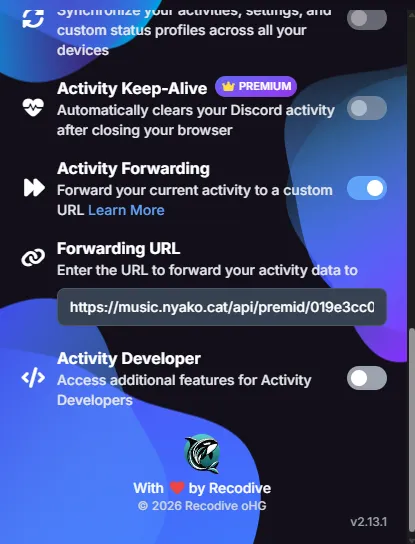
Section titled “PreMid”To use PreMid, enable Activity Forwarding in the extension’s settings.
Set the Forwarding URL to the PreMid API Endpoint link you copied on the setup page.
Do not enter the Widget Link! their extension will not know what to do with our widget. lmao
Other music players
Section titled “Other music players”The widget supports any music source playing on your computer by using a bridge application!